Static vs dynamic QR codes: what's the difference?
QR codes do not expire. Some of the services that make them do. The difference between a static and a dynamic code decides whether yours keeps working in five years, and most free generators do not make it obvious which one you got.
A QR code is a printed pattern. It has no battery, no connection and no account. It cannot expire, and nothing about the paper it is printed on changes over time.
So why do people keep finding that their QR code has stopped working?
Because there are two kinds, and only one of them is really just a printed pattern.
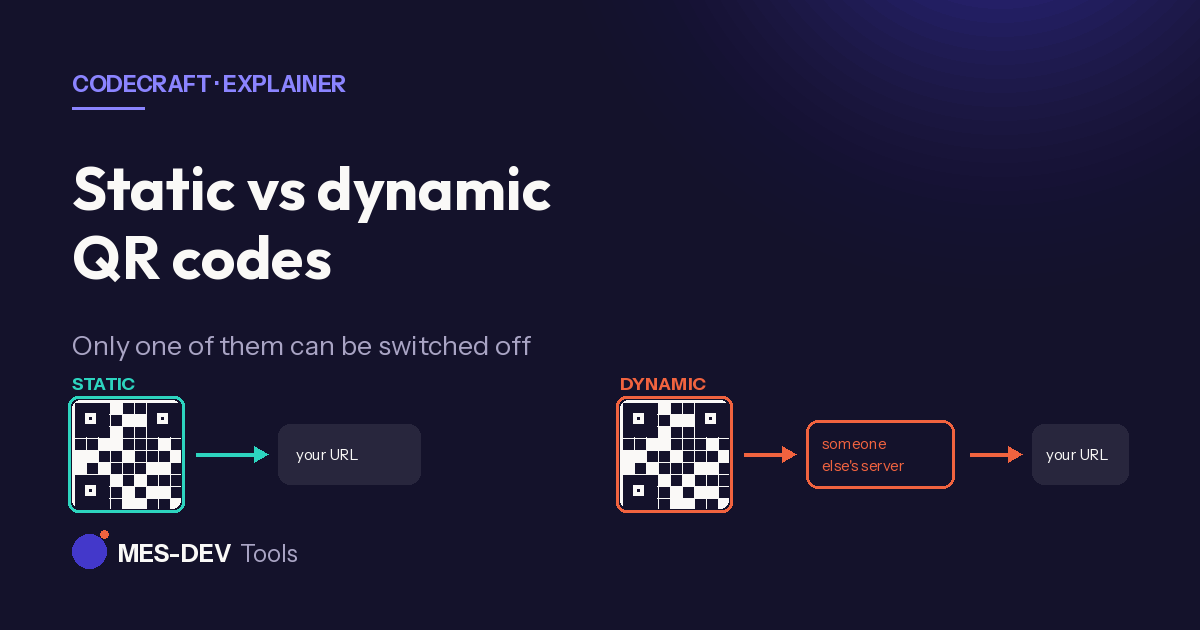
Static: the URL is in the pattern
A static QR code encodes your destination directly. Scan it and the phone reads the URL out of the black and white squares themselves. There is no lookup, no service, no third party.
It cannot expire, cannot be disabled, and does not depend on anyone staying in business. If the destination still exists, the code still works — in twenty years, on a wall, printed on a mug.
The limitation: you cannot change where it points. The destination is physically encoded in the pattern. To point somewhere else you print a new code.
Dynamic: the code points at a redirect
A dynamic QR code encodes a short link belonging to the generator service. Scanning it hits their server, which looks up where you told it to send people and forwards the phone there.
The benefit is real: you can change the destination after printing, and you get scan analytics — how many, when, roughly where.
The cost is that your printed code now depends on a company staying alive and staying free. If the service shuts down, changes its pricing, or decides your free plan has run out of scans, every physical copy stops working at once. That is what people mean when they say their QR code "expired". The code did not expire. The redirect behind it was switched off.
How to tell which one you have
Scan your own code with any phone and look at the URL it opens before you tap through.
- If it shows your own domain, it is static.
- If it shows a short domain you do not recognise — the generator's brand, or a random string of characters — it is dynamic, and it is routing through someone else.
Do this before printing anything in volume. It is the difference between a poster that works forever and a poster that works until a company you have never dealt with changes its mind.
Which to use
Use static for anything printed, permanent, or out of your control once it ships: packaging, business cards, signage, menus, product labels, equipment tags, a WiFi code on a guest-room wall.
Use dynamic when the destination genuinely needs to change — a seasonal campaign, an event schedule that shifts, a link you expect to update — and when you accept the dependency and would rather have the analytics.
A useful middle path: make a static code that points at a short URL on your own domain, then redirect that yourself. You keep the ability to change the destination without handing control of a printed asset to a third party.
The other reason codes fail
Not every failure is expiry. The common physical causes:
- Too small for the amount of data. A long URL needs more squares, and more squares in the same printed area means each one is smaller. Shorten the URL rather than shrinking the code.
- Not enough quiet zone. A QR code needs clear space around it — roughly four modules' worth. Crop it tight against other artwork and scanners struggle.
- Inverted or low contrast. Dark on light works. Light on dark fails on many scanners, as does any pairing without strong contrast.
- Printed on a curve — bottles, tubes, cups. Test on the actual object, not on a flat proof.
Generating one
CodeCraft generates QR codes and barcodes on your own Windows PC. Every code it produces is static by design — the destination is in the pattern, nothing routes through a server, and there is no account, no scan limit and no expiry. Every code type is free and unlimited.
Related reading: a QR code that never expires, WiFi QR code generator, and barcode generator offline.